Xero Tip: Using Bank Rules to Automate Your Bookkeeping
Keeping your bookkeeping up to date can often involve coding the same types of transactions repeatedly. Xero’s Bank Rules feature helps automate this process by recognising common transactions in your bank feed and suggesting the correct coding automatically. When set up properly, Bank Rules can reduce manual data entry, speed up reconciliation and help keep your financial records consistent.
What Are Bank Rules in Xero?
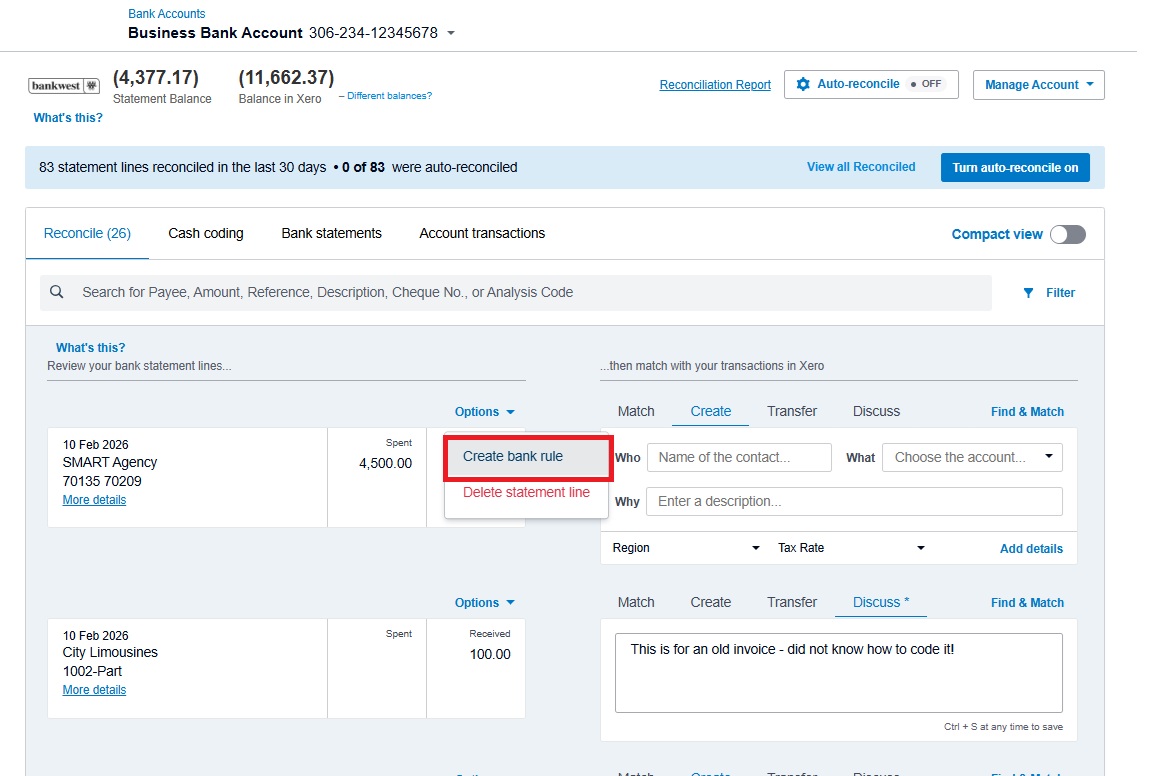
Bank Rules are automated instructions within Xero that tell the system how to treat certain transactions coming through your bank feed.
For example, if your business regularly pays the same software subscription or receives income from the same customer, Xero can recognise these transactions and automatically assign the correct account, tax rate and description.
When the transaction appears in your bank feed, the coding will already be suggested, allowing you to review and reconcile it quickly.
Common Examples of Bank Rules
Many businesses use Bank Rules for recurring transactions such as:
- Monthly software subscriptions
- Office rent payments
- Utilities and internet bills
- Fuel or vehicle expenses
- Merchant fees from payment platforms
- Regular supplier payments
By setting up rules for these types of transactions, Xero can automatically apply the correct coding each time they appear in the bank feed.
The following video from Xero demonstrates how Bank Rules can be created and applied when reconciling bank transactions:
How Bank Rules Can Save Time
Reconciling bank transactions is one of the most repetitive bookkeeping tasks for many businesses. Bank Rules can help streamline this process by:
- Automatically suggesting the correct account
- Applying GST treatment consistently
- Reducing manual data entry
- Speeding up the reconciliation process
Over time, this can significantly reduce the time spent on routine bookkeeping tasks.
A Tip When Setting Up Bank Rules
While Bank Rules are very useful, they should be set up carefully.
Rules that are too broad may incorrectly code transactions. It is generally better to create more specific rules based on supplier names, transaction descriptions or reference details.
It is also good practice to review your rules periodically to ensure they continue to reflect how your business transactions should be recorded.
Automation features like Bank Rules are one of the reasons cloud accounting platforms such as Xero have become so popular with small businesses. When configured properly, they can simplify bookkeeping, improve consistency and reduce the time spent on reconciliation.
If you are considering moving to Xero, you can currently receive 95% off your Xero plan for the first six months when you subscribe by 31 March. Sign up now.